






Nectareon provides a complete ready-made multi-restaurant food ordering and delivery software designed for both web and mobile platforms. The solution helps restaurant businesses manage online orders, deliveries, and operations efficiently while enabling customers to browse menus and place orders with ease.
Our multi-restaurant food delivery software is a scalable end-to-end solution suitable for single-restaurant and multi-vendor business models. Built on proven workflows inspired by leading platforms, the system supports various on-demand services such as food delivery, pizza delivery, meat delivery, and more—all through a centralized admin panel.
We offer a fully customizable restaurant delivery software solution tailored to your business requirements. The platform includes advanced features such as real-time order tracking, vendor management, delivery coordination, and customer notifications to ensure smooth operations and high customer satisfaction.
Whether you operate a single restaurant or plan to launch a large-scale on-demand food delivery business, Nectareon’s ready-made solution enables you to launch faster with full source code ownership. Customers can easily browse menus, place orders online, track deliveries in real time, and receive their orders at their doorstep through web and mobile apps.
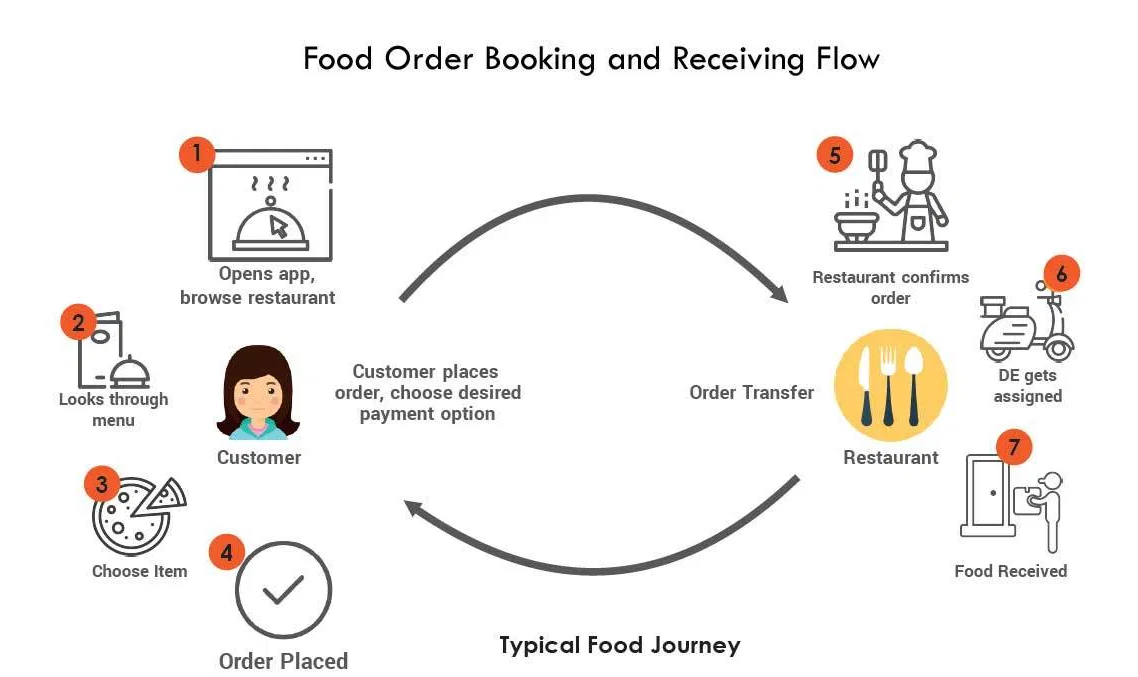
Customers search for restaurants based on their location and view a list of nearby restaurants available for delivery.
Customers browse the menu and place orders through the website or mobile application, which are instantly sent to the selected restaurant.
The restaurant confirms the order and notifies the customer with order details and the estimated delivery time.
The restaurant prepares the order according to the customer’s request and gets it ready for delivery.
The restaurant assigns the order to delivery staff, who receive real-time notifications and update the delivery status.
The delivery staff delivers the order to the customer’s address. Upon successful delivery, confirmation is recorded and notifications are sent to both the customer and restaurant.
Purchase the software with a one-time license and gain full ownership of the system. No recurring fees, complete control, and the flexibility to scale your business as needed.
Get complete access to the full source code, allowing you to customize features, workflows, and integrations to match your business requirements.
Launch the platform under your own brand identity with custom logos, themes, and UI elements tailored to your business requirements.
The solution includes fully functional web and mobile applications, enabling customers, vendors, and administrators to manage operations seamlessly across platforms.
The Admin Control Panel provides centralized access for administrators to manage platform settings, users, orders, and overall system operations with full control.
The admin can manage multiple cuisine categories that restaurants can select while adding food items to their menus.
The admin can manage ingredient lists that restaurants can use while adding or updating menu items in their panel.
The main group can be fixed such as food and its sub group can be managed by admin and it will use for adding up new item from restaurant panel.
The admin can approve and manage multiple restaurants or outlets, including their orders, transactions, menus, reports, and customer reviews from a centralized panel.
The admin can monitor and manage all customer accounts, while customers can update their profile information through their own user panel.
The admin can manage content pages such as About Us, Terms & Conditions, Privacy Policy, and Disclaimer through the built-in CMS.
General settings are being updated by admin for entire site and it can have such as min order, preorder,restaurants type,timings, restaurant address etc.
The admin can configure global site settings such as minimum order value, pre-orders, restaurant types, operating hours, and restaurant address details.
Restaurants can manage their own menu items, including adding, editing, and mapping applicable add-ons for each item.
Single-vendor restaurants can create their own ingredient types and ingredients, while multi-vendor restaurants can use ingredient options configured by the admin.
Restaurants can configure and use their preferred payment gateways, which are displayed to customers during checkout.
Restaurants can view and manage all incoming orders, update order statuses, and process them through each stage until completion.
Restaurants can view and manage customer reviews and ratings submitted after order completion.
Once an order is placed, the restaurant can assign the order to delivery staff for fulfillment and delivery.
Instant notifications are sent to the restaurant when an order is placed, and customers receive confirmation once the order is accepted.
Restaurants can manage each order by updating its status, and customers can cancel orders before they are prepared.
Each restaurant can configure settings such as operating hours, minimum order value, delivery charges, and other service preferences.
Customers can sign up through the website or mobile app and manage their profile details, including addresses and contact information.
During checkout, customers can choose their preferred delivery option, such as home delivery or self pickup.
Customers can search for restaurants based on their current location or a preferred delivery area.
Customers can use an in-app wallet to store balance and make quick, secure payments.
Customers can view and track all their past orders, including order dates, amounts, and transaction details.
Customers can use option at the time of checkout for order they can choose cash on delivery or online payment which is offered.
During checkout, customers can choose between cash on delivery or available online payment methods.
Customers can track their active and completed orders, view order details, and monitor delivery status from their account.
Customers can submit reviews and ratings for restaurants and orders, and save their favourite restaurants or items for future orders.
Delivery staff can log in to the app to access assigned orders. Delivery accounts can be created and managed by restaurants.
Delivery staff receive assigned orders in the app and can accept them to begin the delivery process.
Delivery staff can update their profile information, including name, contact details, and address.
Delivery staff can update their profile information, including name, contact details, and address.
The app tracks the real-time location of delivery staff, which can be viewed by the restaurant for monitoring and shown to customers during order tracking.
Customers can rate and review delivery staff, helping track performance and build a reliable delivery reputation.
Our FoodPanda clone is a ready-made online food ordering and delivery software that helps restaurants manage online orders and increase digital sales efficiently.
Our Swiggy clone is a ready-made food delivery software with fully functional iOS and Android mobile apps. It helps restaurants manage online orders efficiently and expand their reach to increase overall sales.
Our Zomato clone is a ready-made restaurant food ordering and delivery software designed for single and multi-chain restaurants. The platform includes modern web and mobile apps to help businesses increase online orders and revenue.
Our Just Eat clone is a ready-made online food ordering and delivery software with fully developed iOS and Android applications. The platform helps restaurants increase online visibility, manage orders efficiently, and grow customer reach.
Our UberEats clone is a ready-made multi-restaurant food ordering and delivery software that enables customers to place orders through web, Android, and iOS applications. The platform helps restaurants manage online orders efficiently and expand their digital reach.
Our Delivery Hero clone is a ready-made restaurant online ordering and delivery software that enables customers to place food orders through web, Android, and iOS applications. The platform helps restaurants manage online orders efficiently and expand their digital presence.
Our GrubHub clone is a ready-made food delivery software built with PHP and provided with full source code. The platform helps restaurants launch online ordering and delivery services efficiently and scale their business in competitive markets.
Our Talabat clone is a ready-made online food ordering and delivery software designed for restaurant-based businesses, especially in Middle East markets. Customers can browse restaurant menus and place orders through web, Android, and iOS applications.







Yes. You receive complete access to the full source code under a one-time license. This allows you to customize, modify, and deploy the software for your business needs.
Yes. We have a dedicated in-house team of developers and support engineers to assist with setup, customization, and maintenance.
Mobile apps help increase customer engagement, brand visibility, repeat orders, and overall revenue. A dedicated app makes ordering faster and improves customer loyalty.
Food delivery platforms earn revenue through restaurant commissions, delivery charges, promotional listings, advertisements, and optional subscription plans for vendors.
Yes. We offer complete customization services including UI changes, feature enhancements, integrations, and business-specific workflows.
The cost depends on your selected features, platform requirements (web, Android, iOS), and customization needs. Contact us to receive a detailed pricing estimate.
Ready-made solutions help you launch faster, reduce development costs, and use proven workflows inspired by popular food delivery platforms.
Yes. We provide free post-launch support for a limited period. Extended maintenance and support plans are also available based on your requirements.
Since this is a ready-made solution, deployment can be completed within 7–10 working days, including branding, configuration, and app store submissions.
Countries we work with
India | Dubai | France | New Zealand | United Kingdom | Egypt | Ghana | Iran | USA | Zambia | Slovakia | Mauritius | Nigeria | Chile | Poland | Canada | Russia | Germany | Hong Kong | Saudi Arabia | Colombia | Qatar | Kuwait | Singapore | South Africa | Kenya | Spain | Iraq | Belgium | Malaysia | UAE | Philippines | Japan | Turkey | Palau | Botswana | Norway | Israel | New Zealand | Romania | Sri Lanka | Netherlands | Algeria | Mexico | Lebanon | Libya | Burundi | Maldives | Malta | Italy | Tanzania | Bahrain | Sudan | Swaziland | Namibia | Vatican City | Panama | Ukraine | Paraguay | Senegal | Belarus | Oman | Korea | Slovenia | Kosovo | Australia | Serbia | Jamaica | Thailand | Armenia | Haiti | Greece | Ethiopia | Morocco | Zimbabwe | Samao | Cambodia | Taiwan | Brazil | Peru | Cyprus | Angola | Brunei | Jordan | Georgia | Uzbekistan | Micronesia | Venezuela | Sweden | Fiji | Finland | Latvia | Ireland | Costa Rica | Seychelles | Portugal | Luxembourg | Czech Cuba | Vietnam | Hungary | Lithuania | Switzerland | Estonia | Equatorial Guinea | Papua New Guinea | Argentina | Congo | Turkmenistan | Bulgaria | Rwanda | Denmark | Laos | Indonesia | Liechtenstein | Kazakhstan | Uruguay | Cambodia | Cameroon | Moldova | Tunisia | Venezuela | Barbados | Guatemala